
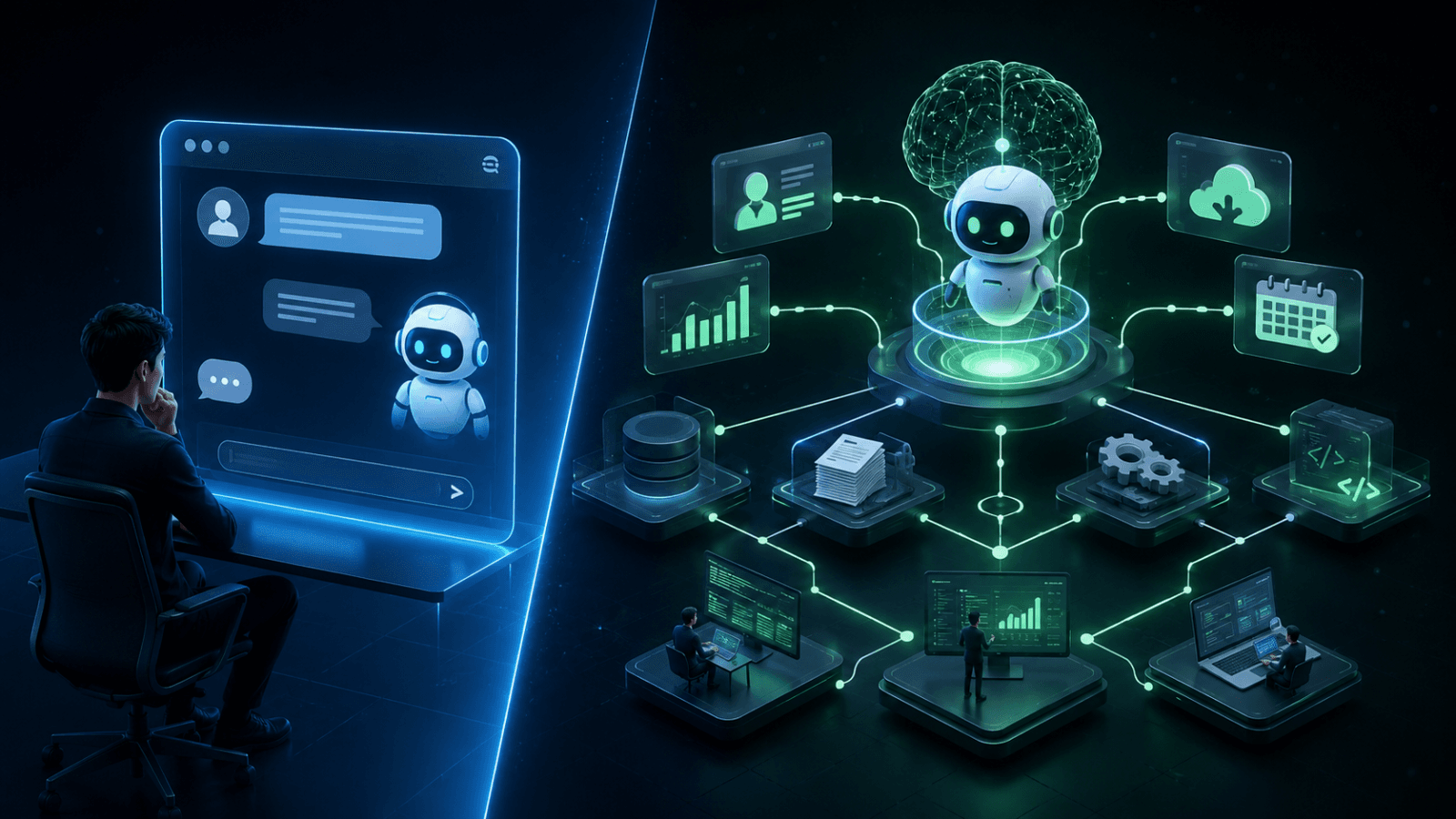
Understand the difference between AI agents and AI chatbots, how they work, where each fits, and which solution is right for your business.
AI Agent vs AI Chatbot: What’s the Difference?
An AI chatbot is a conversational software system designed primarily to understand questions and provide responses, while an AI agent can understand a goal, make decisions, use tools, and perform actions on a user’s behalf. The difference is not simply about how intelligent the system sounds—it is about whether the system can take action and complete tasks.
Businesses increasingly use both technologies, but they solve different problems.
A chatbot may answer a customer’s question about an order.
An AI agent could check the order system, identify the shipment status, determine whether a delay has occurred, create a support ticket, and notify the customer.
Understanding this distinction is important when deciding what kind of AI solution your business actually needs.
⸻
What Is an AI Chatbot?
An AI chatbot is a conversational application that interacts with users through natural language.
Modern AI chatbots can understand context, answer questions, summarize information, recommend options, and maintain conversations across multiple turns.
Typical chatbot capabilities include:
For example, a customer might ask:
“What are your delivery options?”
The chatbot can provide the relevant information immediately.
The interaction is primarily question → understanding → response.
That makes chatbots particularly useful when the primary requirement is communication.
⸻
What Is an AI Agent?
An AI agent is a software system that can interpret a goal, reason about the task, use available tools, and take actions to achieve an outcome.
Instead of simply generating a response, an AI agent can potentially:
For example, instead of answering:
“Can you help me reschedule my appointment?”
an AI agent could check availability, identify suitable time slots, update the appointment system, and confirm the new booking.
The key difference is conversation → decision → action.
⸻
AI Agent vs AI Chatbot: A Quick Comparison
Feature AI Chatbot AI Agent
Conversational interaction Yes Yes
Answers questions Yes Yes
Understands context Usually Yes
Uses external tools Sometimes Core capability
Makes decisions Limited Yes
Executes tasks Limited Yes
Works across business systems Limited Yes
Multi-step workflows Limited Strong
Autonomous operation Usually limited Designed for it
Human approval Often unnecessary for simple answers Can be built into workflows
Best for Communication Automation and task completion
The distinction is therefore less about the interface and more about capability and responsibility.
⸻
How Does an AI Chatbot Work?
An AI chatbot generally follows a conversational pipeline.
The user enters a question or request through a website, mobile application, messaging platform, or another interface.
The AI model analyzes the message to understand the user’s intent and relevant context.
Depending on the implementation, the chatbot may retrieve information from a knowledge base, documents, databases, or APIs.
The system uses the available information and conversation context to produce a natural-language response.
The process repeats as the user asks additional questions.
A chatbot can therefore become highly sophisticated while still remaining primarily conversation-oriented.
⸻
How Does an AI Agent Work?
AI agents introduce an additional layer: planning and execution.
For example:
“Find the best available appointment this week and book it for me.”
The system identifies what the user wants rather than treating the message as a simple question.
It determines which steps are required to complete the task.
Depending on its permissions, the agent may interact with:
If the first action does not produce the desired result, the agent may adjust its approach.
Once the objective is achieved, it reports the outcome to the user.
This makes AI agents particularly valuable for multi-step business workflows.
⸻
Are AI Agents More Advanced Than Chatbots?
Not necessarily in every situation.
AI agents are generally more capable when a task requires planning, tool usage, decision-making, and execution. However, that does not mean every business should replace its chatbot with an AI agent.
A simple FAQ system does not need autonomous decision-making.
For example, if a customer only wants to know:
“What time does your support team open?”
a chatbot is perfectly suitable.
Adding an AI agent to answer that question could introduce unnecessary complexity.
The right solution depends on the business problem, not the technology label.
⸻
What Are the Best Use Cases for AI Chatbots?
AI chatbots work particularly well when customers or employees need quick access to information.
Customer Support
Chatbots can answer common questions about:
Website Assistance
A website chatbot can help visitors discover the right product, service, or resource.
Internal Knowledge
Employees can use chatbots to ask questions about company documentation, policies, procedures, and internal resources.
Lead Qualification
A chatbot can ask prospects questions, collect contact information, understand requirements, and route qualified leads to sales teams.
Educational Applications
Chatbots can provide conversational learning assistance, explanations, and interactive guidance.
⸻
What Are the Best Use Cases for AI Agents?
AI agents become more valuable when the objective involves multiple systems or actions.
Sales Automation
An AI agent can potentially research prospects, update CRM records, prepare summaries, and trigger follow-up workflows.
Customer Service Automation
An agent can investigate customer issues across multiple systems before responding.
Business Operations
Agents can assist with repetitive operational workflows involving documents, databases, applications, and approvals.
Appointment Management
An agent can check availability, coordinate schedules, and update booking systems.
IT Operations
AI agents can help monitor issues, investigate predefined problems, retrieve system information, and initiate approved workflows.
Research and Analysis
An agent can gather information from multiple sources, organize findings, and prepare a structured report.
⸻
Where Does RAG Fit Into AI Chatbots and AI Agents?
Retrieval-Augmented Generation (RAG) allows an AI application to retrieve relevant information from external knowledge sources before generating an answer.
RAG can be used in both chatbots and AI agents.
For example, a business could connect an AI system to:
A chatbot could use RAG to answer questions using company-specific information.
An AI agent could use the same knowledge while also taking actions through connected tools.
This creates an important distinction:
RAG provides knowledge. An agent provides reasoning and action around that knowledge.
⸻
AI Chatbot vs AI Agent: Which One Should Your Business Choose?
Choose an AI chatbot when your main requirement is conversational assistance and information delivery.
Choose an AI agent when the system needs to perform tasks, make decisions, interact with business systems, or manage multi-step workflows.
A simple decision framework is:
Choose a Chatbot If:
Choose an AI Agent If:
Consider Combining Both
Many businesses can benefit from using both.
A chatbot can provide the conversational interface while an AI agent handles actions behind the scenes.
For example:
Customer:
“Can I change my delivery address?”
AI system:
Understands the request.
Agent:
Checks the order system → verifies eligibility → updates the address → records the change.
Chatbot:
Confirms the completed action to the customer.
Here, the chatbot handles the conversation, while the agent handles the workflow.
⸻
What Does an AI Agent Architecture Usually Include?
A production AI agent can contain several interconnected components.
Large Language Model
The model provides natural-language understanding and generation.
Memory and Context
The system maintains relevant conversation or task context.
Retrieval Layer
RAG or other retrieval mechanisms provide access to business knowledge.
Tool Layer
Tools allow the agent to interact with external systems.
Planning and Reasoning
The agent determines which steps are required to accomplish a goal.
Guardrails
Rules and permissions constrain what the agent can do.
Human Approval
Sensitive actions can require approval before execution.
Monitoring
Logs and observability help teams understand what the system is doing and identify failures.
A reliable AI agent therefore involves much more than connecting a language model to a chat interface.
⸻
What Are the Risks of AI Agents?
Greater autonomy also introduces greater responsibility.
An AI chatbot that provides an incorrect answer is a problem.
An AI agent that performs an incorrect action can create a much larger operational problem.
Businesses should therefore consider:
The principle is simple:
Give an AI system only the permissions it needs to perform its job.
Critical actions should have appropriate controls rather than unrestricted autonomy.
⸻
How Do You Build an AI Agent for a Business?
A practical AI agent development process usually begins with the workflow rather than the AI model.
Step 1: Identify the Business Problem
Start with a repetitive, measurable process.
For example:
“Our support team spends several hours every day collecting information from three internal systems before responding to customers.”
That is a better starting point than simply saying:
“We want an AI agent.”
Step 2: Map the Existing Workflow
Document:
Step 3: Determine What the AI Should Handle
Separate tasks into:
Automated actions
and
Human-controlled actions
Step 4: Connect the Required Data and Tools
Integrate the APIs, databases, knowledge bases, and applications required by the workflow.
Step 5: Add Guardrails
Define what the agent can and cannot do.
Step 6: Test Real Scenarios
Test normal cases, edge cases, failures, ambiguous requests, and unauthorized actions.
Step 7: Monitor and Improve
Track outcomes and continuously improve prompts, retrieval, tools, workflows, and safeguards.
This approach creates an AI solution around a measurable business outcome rather than building technology for its own sake.
⸻
How Much Automation Should an AI Agent Have?
Not every AI agent should operate completely autonomously.
A useful model is to divide actions into three categories:
Action Type Recommended Approach
Low-risk information retrieval Automate
Routine reversible actions Automate with monitoring
Financial, legal, or irreversible actions Require appropriate approval
The right level of autonomy depends on the consequences of failure.
In many enterprise environments, controlled autonomy is more practical than unrestricted autonomy.
⸻
Why Businesses Are Moving Beyond Traditional Chatbots
Traditional chatbots often focus on reducing the number of questions handled by human employees.
AI agents can go one step further by reducing the amount of manual work required to complete a process.
Consider customer support.
A conventional chatbot may answer:
“Your order is currently in transit.”
An AI agent could potentially:
The difference is significant.
The goal changes from answering customers to resolving tasks.
⸻
What Should Businesses Consider Before Building an AI Agent?
Before starting development, evaluate the workflow itself.
Ask:
If these questions cannot be answered, the business process may need to be clarified before AI development begins.
⸻
How Can an AI Development Company Help?
Building a production-ready AI agent typically requires more than prompt engineering.
A capable AI development partner should understand:
The objective should be to build a reliable system that fits the company’s existing technology environment.
MYST International focuses on building intelligent digital products across AI, custom software, web applications, and mobile applications, making this type of integrated AI development part of a broader software-development approach.
⸻
Frequently Asked Questions
Is an AI agent the same as a chatbot?
No. A chatbot primarily focuses on conversation and information delivery, while an AI agent can reason about goals, use tools, make decisions, and execute tasks. Some modern chatbots can include agent capabilities, so the distinction is based on functionality rather than the chat interface itself.
Can a chatbot become an AI agent?
Yes. A chatbot can become part of an agent-based system by adding capabilities such as tool usage, workflow execution, external system integrations, planning, memory, and controlled decision-making.
Is RAG required for an AI agent?
No. RAG is not mandatory for every AI agent. However, RAG can be valuable when an agent needs access to company-specific, frequently changing, or large volumes of external information.
Are AI agents expensive to build?
The cost depends on the complexity of the workflow, integrations, AI models, security requirements, data architecture, and level of automation. A narrowly defined agent can be considerably simpler than a multi-system enterprise agent.
Should every business build an AI agent?
No. Businesses should first identify a process where automation can produce measurable value. For simple information-based interactions, a chatbot or conventional automation may be a better choice.
Can AI agents work with existing business software?
Yes. AI agents can be designed to interact with existing software through APIs, databases, automation platforms, and other controlled integration mechanisms, provided the systems expose suitable interfaces and permissions.
⸻
Related Articles
⸻
Final Thoughts
The difference between an AI chatbot and an AI agent comes down to what the system is expected to accomplish.
A chatbot is primarily designed to communicate.
An AI agent is designed to act.
For businesses, the best choice is not necessarily the technology with the most capabilities. It is the technology that solves the right problem with an appropriate level of automation, control, security, and measurable business value.
Start with the workflow. Identify the repetitive work. Define what should be automated. Then choose the AI architecture that can reliably deliver the outcome.
That is how AI moves from an interesting conversational interface to a practical business system.